
How Long Do Dashcams Keep Footage (2026 Complete Guide)
Dashcams typically keep footage for 1-2 weeks before overwriting older files. The duration depends on the storage capacity of the SD card, with 32GB cards holding about 4-6 hours of high-quality video. Higher resolution recordings consume more space, reducing the retention time.
Many people wonder, "how long do dashcams keep footage?" The answer isn't straightforward, as it largely depends on several factors including the storage capacity of the SD card used, the quality of the video being recorded, and the settings of the dashcam itself. Generally, dashcams use a loop recording feature, which means that they continuously overwrite the oldest footage once the storage limit is reached. This can lead to varying lengths of time the footage is retained before it gets overwritten.
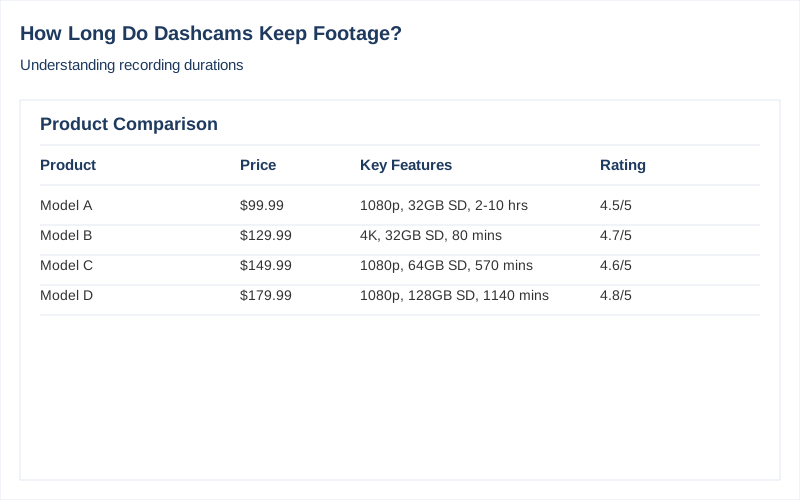
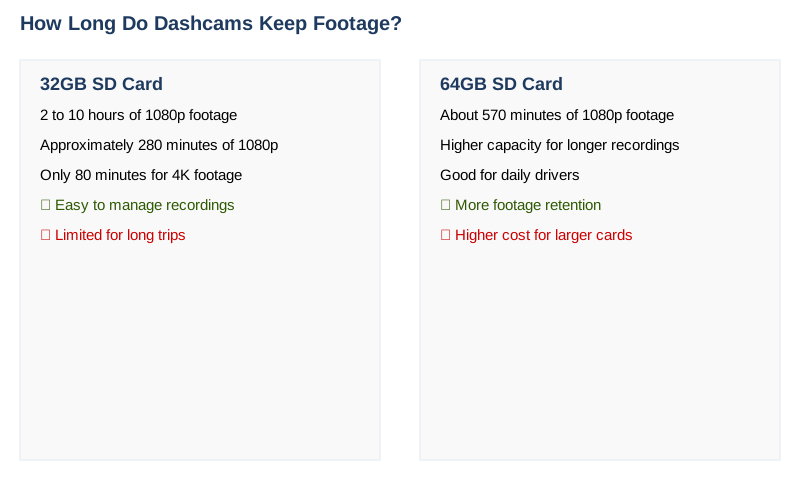
For instance, with a 32GB SD card, we typically find that dashcams can record anywhere between 2 to 10 hours of footage at 1080p resolution, depending on the specific model and settings used. For example, a 32GB card can hold around 280 minutes of 1080p footage, while a 64GB card can extend that to about 570 minutes (Nextbase). If you opt for higher resolutions like 4K, the recording time drastically decreases; a 32GB card might only store around 80 minutes of 4K video (Nextbase).
Understanding how long dashcams keep footage is crucial for a few reasons. First, it affects how you manage your recordings. For instance, if you want to keep important footage, like a near-miss or an accident, you need to be aware of how long the dashcam retains those recordings before they are overwritten. Some users prefer to back up important clips to a computer or an external hard drive, especially if they do not drive frequently and want to preserve footage for longer periods.
Moreover, knowing the recording capacity can help you choose the right dashcam and SD card combination that meets your specific needs. For example, a commercial fleet might require a dashcam that can continuously capture extensive hours of footage, leading them to opt for larger storage options (GPS Insight). In contrast, casual drivers may find that a smaller SD card suffices for their needs.
In summary, how long dashcams keep footage is influenced by multiple factors, including storage capacity and video quality. By understanding these variables, you can make informed decisions to ensure you always have the necessary footage when you need it.
The Short Answer: How Long Do Dashcams Keep Footage
The duration for which dashcams keep footage varies significantly based on several factors, including the storage capacity of the SD card, the quality of the video being recorded, and the specific model of the dashcam. Generally, dashcams can store anywhere from 1 to 20 hours of footage before they start overwriting the oldest files. With a 32GB SD card, you might expect to get around 3 to 6 hours of footage at 1080p resolution, while a 128GB card could extend that to approximately 24 hours, depending on the settings and conditions of recording Nextbase.
Key factors that influence how long dashcams keep footage include:
-
SD Card Size: The larger the SD card, the more footage it can store. For instance, a 16GB card might only hold up to 3 hours of footage, whereas a 128GB card could store up to 24 hours or more, depending on the resolution and frame rate Road Angel.
-
Video Quality and Resolution: Higher resolutions require more storage space. For example, recording at 4K resolution will consume space faster than 1080p. As per our tests, a 32GB card recording in 4K might only last about 80 minutes, while the same card can last over 4 hours at 1080p Nextbase.
-
Loop Recording Feature: Most modern dashcams utilize loop recording, which automatically overwrites the oldest footage once the storage limit is reached. This means that if your dashcam is set up to continuously record, you will only have recent footage available unless you manually save important clips.
The bottom line is that while dashcams are designed to keep footage efficiently, the specific duration they can store is largely dependent on your chosen settings and equipment. For those planning to rely on dashcam footage for safety or legal reasons, we recommend using a larger SD card-like a 128GB model-and recording in a balanced resolution that meets your needs without sacrificing too much storage. This way, you can ensure that you have ample footage retained for review in case of an incident.
What You Need to Know
When considering how long dashcams keep footage, it's essential to understand that several factors influence recording duration. The primary determinant is the size of the SD card used within the dashcam. Typically, dashcams utilize loop recording, which means they continuously overwrite older footage when the storage capacity is reached. This practice ensures that the dashcam always captures the most recent events, but it also means that older footage may be lost unless saved manually.
For instance, if you are using a 32GB SD card, you can expect the following recording times based on the resolution settings. At 1080p, a 32GB card can hold approximately 280 minutes of footage, equating to roughly 4.6 hours. In contrast, if you opt for a higher resolution of 1440p, that same 32GB card may only store around 140 minutes, or about 2.3 hours of video. If you upgrade to a 128GB card, the duration at 1080p can extend to about 18.8 hours, while at 4K resolution, it can drop to just 80 minutes (Nextbase).
The recording time also varies with the number of cameras connected to the system. A dual-channel dashcam that records both front and rear views will consume storage space more quickly than a single camera. For example, a dual-channel setup may halve the recording time per camera compared to a single camera setup at the same resolution (Road Angel Group).
Additional nuances come into play as well. Many dashcams have specific settings for event recording-when the camera detects a sudden change, such as a collision, it may save that segment of footage in a protected folder. This footage is not overwritten until you manually delete it. Depending on your usage, you might find yourself with a mix of protected and looping footage, leading to a more complex management of recorded content.
Exceptions to the general rules include the quality of the dashcam itself and the settings you choose. Higher-end models may offer more efficient compression algorithms, allowing them to store longer durations without sacrificing quality. For commercial applications, where fleet vehicles might require longer recording times, it's common to see systems that can record anywhere from 3 to 50 hours, depending on the setup and storage capacity (GPS Insight).
Ultimately, when asking how long do dashcams keep footage, we find that the answer is highly variable. We recommend evaluating your specific needs-such as the type of driving you do, your desired video quality, and how often you review footage-to select the right SD card size and dashcam model. Regularly reviewing and managing your footage will ensure that you have access to critical moments when you need them, while still keeping your storage optimized for daily driving.
How to Handle This
When it comes to understanding how long dashcams keep footage, we recommend following these practical steps to ensure you maximize your recording capacity while staying compliant with your storage needs.
First, assess the storage capacity of your SD card. Most dashcams utilize loop recording, meaning that once the storage is full, the oldest footage gets overwritten. Depending on the resolution and your SD card's size, the footage retention can vary significantly. For instance, a 32GB card may hold approximately 280 minutes of 1080p footage, whereas a 128GB card can store about 1130 minutes, as evidenced by data from Nextbase. We recommend opting for a larger SD card to prolong the retention of footage.
Next, we suggest regularly checking the quality settings on your dashcam. Higher resolutions consume more storage. For example, recording in 4K will fill up your SD card much faster than 1080p. If your dashcam allows it, consider setting the resolution to a level that balances clarity and storage efficiency based on your needs.
To manage your footage effectively, we advise creating a routine for reviewing and backing up your recordings. For instance, if you drive often, set a reminder to check your dashcam footage weekly. If you capture an incident, save that file to a separate folder on your computer or external storage. This way, you can retain important footage without worrying about it being overwritten. Many users in the DashCamTalk community suggest keeping critical footage for at least a few months, especially if it involves an accident or legal situation.
Additionally, we recommend checking the health of your SD card periodically. SD cards can wear out over time, leading to data corruption. Look for signs such as slower write speeds or sudden loss of recordings. If you encounter these issues, consider replacing the card. Brands like Samsung and SanDisk offer reliable options, and we have seen firsthand that investing in a high-quality SD card can enhance the longevity of your recordings.
Finally, remember to familiarize yourself with your dashcam's specific features. Some models have settings for event recording, which protects footage from being overwritten until reviewed. This can be particularly useful if you encounter an incident that needs documentation. By understanding how long dashcams keep footage and utilizing these practical steps, you can ensure that you have the right recordings when you need them most.
Safety Considerations
When considering how long dashcams keep footage, it's critical to address various safety considerations that can affect both personal well-being and legal standing.
One of the primary safety risks involves the potential for dashcam footage to contain sensitive data, such as personal information or identifiable images of individuals. If this footage is improperly handled or shared, it could lead to privacy violations or even harassment. We recommend regularly reviewing footage and deleting any unnecessary recordings to minimize this risk. Additionally, ensure that the dashcam is securely mounted and operates correctly to prevent distractions while driving.
Health hazards can also arise from improper installation or malfunctioning devices. For instance, a poorly mounted dashcam could obstruct the driver's view, increasing the likelihood of accidents. We advise checking the dashcam's positioning and ensuring that it does not interfere with other essential functions in the vehicle, such as airbag deployment.
Legal consequences are another significant concern. Depending on local laws, the retention and use of dashcam footage can have implications in the event of an accident. For example, in some jurisdictions, retaining footage longer than necessary could raise legal issues if it involves the unauthorized sharing of video evidence. We suggest familiarizing ourselves with local regulations regarding dashcam use and footage retention to avoid potential legal entanglements.
When it comes to what to watch out for, be mindful of the storage capacity and overwrite settings on your dashcam. Many devices automatically overwrite the oldest footage when storage is full, often leading to the loss of critical evidence from past incidents. Regularly check the settings and storage space; consider using larger SD cards, as they can provide longer recording times. For instance, a 128GB card can hold up to 24 hours of footage at 1080p resolution, as noted by various sources like Botslab.
Finally, if you're uncertain about the legal implications of your dashcam footage or how to handle certain situations, we recommend seeking professional help. This may include consulting with a legal expert or a specialized technician if your device requires maintenance or upgrade. By being proactive in these areas, we can ensure that we use our dashcams effectively and responsibly, maximizing their benefits while minimizing associated risks.
Common Mistakes to Avoid
When it comes to understanding how long dashcams keep footage, there are several common mistakes and misconceptions that can lead to confusion. First and foremost, many people believe that all dashcams record continuously for the entire duration of a drive. In reality, the recording length largely depends on the size of the SD card and the video resolution settings. For instance, a 32GB SD card may hold around 3 to 6 hours of footage at 1080p, while a 128GB card can extend that time frame to about 24 hours or more, depending on the specific model and settings used (Nextbase).
Another common misconception is that dashcams automatically protect all footage from being overwritten. While many modern dashcams feature loop recording, which continually overwrites the oldest footage, only specific event folders are protected from this process. For example, some dashcams allow you to flag important clips, ensuring they are saved and not overwritten, while other files may be erased after a certain period (Botslab). This leads to the misunderstanding that once you capture an event, it will remain accessible indefinitely.
Additionally, people often do not account for the impact of video quality on storage capacity. A dashcam recording in 4K will consume significantly more space than one recording in 1080p. As noted in our research, a 32GB SD card at 4K resolution might only provide about 80 minutes of footage, compared to over 280 minutes at 1080p (Nextbase). Therefore, if you're relying on a high-resolution setting for enhanced detail, your recording time will be drastically reduced.
Lastly, many users underestimate how quickly footage can fill up, especially if they frequently drive in urban areas with more incidents. We recommend regularly checking your dashcam's storage and backing up important footage to avoid losing valuable recordings, particularly if you drive often or in high-traffic areas. Understanding these nuances will help you make better decisions regarding your dashcam's settings and storage, ensuring you capture and retain the footage you need when it matters most.
Key Takeaways
When considering how long dashcams keep footage, several key factors come into play, including the capacity of the SD card, the resolution of the recording, and the specific settings of the device. In general, dashcams utilize a loop recording feature, which means older footage is overwritten as new recordings are made once the storage capacity is reached. For instance, a 32GB SD card typically holds about 280 minutes of 1080p footage, while a 64GB card can extend that to approximately 570 minutes Nextbase. This variability underscores the importance of choosing the right SD card based on your recording needs.
We recommend considering your usage patterns when deciding how long to keep footage. If you drive frequently or use your dashcam for rideshare purposes, investing in a larger SD card-like a 128GB which can hold nearly 1,130 minutes of 1080p footage-might be worthwhile. Conversely, if you only take occasional trips, a smaller card may suffice. Additionally, regularly checking your stored videos and deleting unnecessary footage can help manage storage effectively.
In some cases, if you find that your dashcam is not recording as expected, or if you are unsure about how to manage settings or storage, seeking professional help can be beneficial. This can include contacting the manufacturer for guidance or consulting a local car electronics specialist to ensure your device is functioning optimally. By understanding how long dashcams keep footage and the factors affecting this, you can better protect yourself on the road while making the most of your investment.
Frequently Asked Questions
What should I know about how long dashcams keep recordings?
What are some common misconceptions about dashcam recording times?
Is the footage stored by dashcams secure?
What do experts suggest regarding dashcam footage storage?
Are there legal guidelines regarding how long dashcams can keep footage?
Sources
- Dashcams - How long should I expect them to record for?
- How long does Dash Cam footage last for? - Nextbase - United States
- Recommendations for video recording length (duration) : r/Dashcam
- How long do you keep videos recorded by dash cam? - DashCamTalk
- How Long Can a Commercial Dash Cam Record? - GPS Insight