You're reviewing your dash cam footage after a minor fender-bender, only to find the timestamps are completely off. Instead of the actual date and time of the incident, you see a jumbled mess, perhaps showing clips from months ago or an arbitrary default like January 1st, 2019.
You're reviewing your dash cam footage after a minor fender-bender, only to find the timestamps are completely off. Instead of the actual date and time of the incident, you see a jumbled mess, perhaps showing clips from months ago or an arbitrary default like January 1st, 2019. This isn't just inconvenient; it can render your crucial evidence useless. One user reported finding clips from the 8th dated January 10th, 2019, which then reset back to January 1st, 2019 DashCamTalk, making it nearly impossible to track events. This widespread issue with dash cam date reset can even lead to recording problems, with some cameras refusing to record when the date and time aren't set correctly Facebook. The core of the problem often lies in how the dash cam maintains its internal clock when powered off.
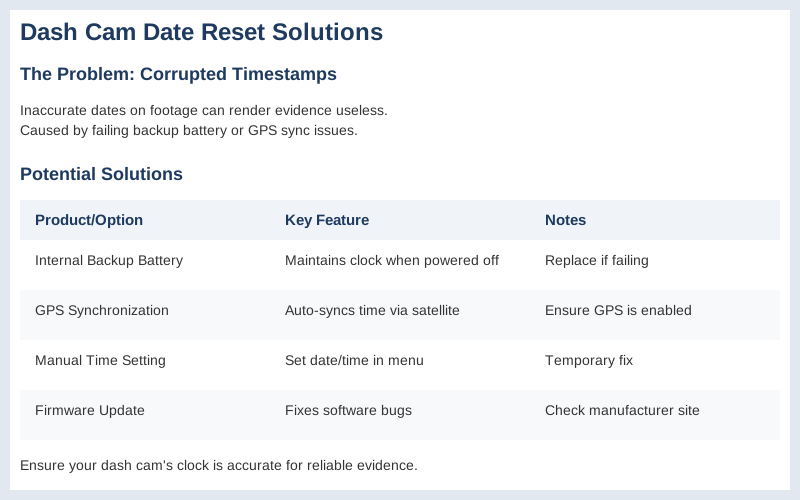
Key specifications for dash cam date reset
The Short Answer
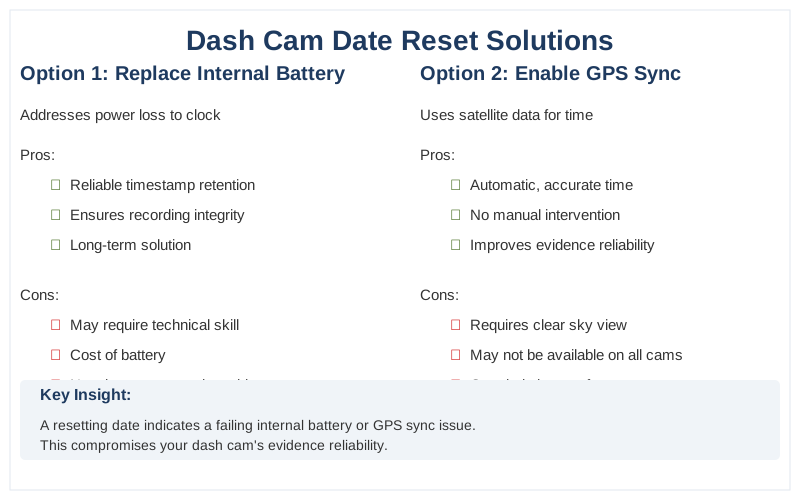
When your dash cam's date and time keep resetting, it's usually a sign of a failing internal backup battery or a GPS synchronization issue. This prevents the camera from retaining accurate timestamps, making your footage less reliable as evidence.
The core problem with a dash cam date reset is that it compromises the timestamp integrity of your recordings. Without accurate time data, it becomes difficult to prove when an event occurred, which is critical for insurance claims or legal matters. We've seen footage where clips from days apart were stamped with the same incorrect date, like Jan 10, 2019, when it was actually much later, or even reset to Jan 1, 2019 DashCamTalk. This makes finding specific clips a nightmare and raises questions about whether the camera is even recording properly.
Many dash cams rely on a small internal battery or capacitor to keep the time settings when the device is powered off. Over time, these can degrade and fail, leading to frequent resets, often noticed after the car has been parked for more than 24 hours DashCamTalk. If your dash cam has a GPS module, it should automatically synchronize the time and date. However, this only works if the time zone is set correctly in the camera's settings and if the GPS signal is strong enough to establish a connection VIOFO Support. Incorrect time zone settings will prevent GPS from accurately updating the time.
If your dash cam lacks GPS or the feature is disabled, you'll need to manually set the date and time. Some users suggest that after a firmware update, it's a good practice to default the camera's settings and then reconfigure them, sometimes even performing a hard reset if the issue persists DashCamTalk. For devices with GPS, ensure your time zone and Daylight Saving Time (DST) settings are accurate; this is the first step to troubleshooting any time discrepancies VIOFO Support. A properly set time zone is also crucial because it can affect GPS location accuracy Blackboxmycar.ca.
To ensure your dash cam operates smoothly, it's helpful to be aware of common dash cam problems.
A detailed view of a car's dashboard gauges, highlighting the importance of precise timestamps on dash cam footage for accurate record-keeping.
| Photo by Mike Bird
A detailed view of a car's dashboard gauges, highlighting the importance of precise timestamps on dash cam footage for accurate record-keeping.
| Photo by Mike Bird
What You Need to Know
1
Dash cam date reset is a common frustration that can render your footage useless for evidence. When your dash cam fails to maintain the correct date and time, it's often due to a depleted internal battery or a GPS synchronization issue. This can lead to clips being mislabeled, making it difficult to locate specific events, or even potentially overwriting older footage if the date rolls back significantly DashCamTalk.
2
GPS synchronization is key for most modern dash cams to maintain accurate time. Ensure your dash cam is properly configured with the correct time zone for your location, including any Daylight Saving Time (DST) adjustments VIOFO Support. If your dash cam has a GPS logger, it should automatically sync the time once the time zone is set correctly. This eliminates the need for manual date and time adjustments, which can be a hassle, especially if you frequently travel across different time zones.
3
Internal battery failure is a frequent culprit when the dash cam date resets after a few days or even overnight. Many dash cams have a small, coin-cell type battery that powers the internal clock when the device is off. These batteries have a limited lifespan, typically around 5-6 years, and when they degrade, the dash cam loses its ability to retain settings DashCamTalk. Replacing this small battery can often resolve persistent date reset issues.
4
Manual reset or firmware update can sometimes clear persistent glitches. If your dash cam settings aren't saving, try a factory reset. Some models have a physical reset button that requires a paperclip to access. After resetting, reconfigure your time zone and other essential settings. Occasionally, a firmware update for your dash cam can also address software bugs that might be causing the date to reset.
5
Vehicle-specific considerations are minimal for dash cam date resets, as the internal mechanisms are similar across sedans, SUVs, trucks, and vans. However, ensure your dash cam is receiving consistent power. For example, if your dash cam is hardwired, double-check the connection to avoid intermittent power loss, which could theoretically affect its ability to maintain settings, though this is less common than battery or GPS issues. Always consult your dash cam's manual for specific instructions on setting the date and time, as interfaces vary between brands and models.
Understanding the importance of accurate timestamps can enhance your experience with various dash cam features.
This close-up of a car's speedometer and tachometer reminds us how crucial functioning vehicle electronics are, including dash cam time synchronization.
| Photo by Elda Sahiti
This close-up of a car's speedometer and tachometer reminds us how crucial functioning vehicle electronics are, including dash cam time synchronization.
| Photo by Elda Sahiti
How to Handle This
1
Verify Time Zone and DST Settings - This is the absolute first step for a dash cam date reset issue. If your dash cam has GPS, it relies on accurate time zone information to automatically sync. Incorrect settings here mean your GPS will pull the wrong time, even if it's functioning perfectly. We've seen dash cams on early morning desert drives in Arizona (which doesn't observe DST) get their timestamps completely skewed because the device was set to a time zone that observes it. Skipping this means your GPS might as well be a paperweight for timekeeping. VIOFO Support emphasizes setting the time zone correctly as the primary step.
2
Check GPS Connection and Signal Strength - Even with the correct time zone, a weak or absent GPS signal prevents the dash cam from updating its clock. This is critical when driving through urban canyons with tall buildings, or deep in national parks with limited satellite visibility. If your dash cam's interface shows it's not locking onto GPS satellites, the date and time will drift or reset. We've had dash cams reset after losing GPS signal during a tunnel passage, only to revert to an old date when exiting. If your dash cam has a separate GPS module, ensure it's properly connected and oriented towards the sky.
3
Inspect Internal Battery/Capacitor Health - Many dash cams use a small internal battery or supercapacitor to maintain settings and the clock when powered off. Over time, especially in extreme heat or cold common in car interiors, these components degrade. A failing battery is the most common culprit for a dash cam date reset that happens consistently, often after a few days or even just overnight. One user reported their Viofo A119 v3 resetting every couple of days, with clips showing incorrect dates, suggesting a battery issue DashCamTalk. If your dash cam is more than 3-5 years old, this is a likely suspect. Replacing this component is often the only fix.
4
Perform a Factory Reset and Reconfigure - Sometimes, software glitches can cause the date and time to reset. A factory reset wipes all custom settings and returns the dash cam to its default state. After resetting, immediately reconfigure your time zone and ensure GPS is enabled. This process can resolve persistent issues that aren't hardware-related. However, if the date continues to reset after a factory reset, it strongly points to a hardware failure, likely the internal battery. Garmin Support recommends a reset for incorrect timestamps, followed by re-setup.
To navigate the complexities of using dashcam footage, it's important to familiarize yourself with the relevant dash cam laws.
A car's dashboard clock at 11:13 serves as a reminder to verify your dash cam's time zone settings to prevent date reset problems.
| Photo by Erik Mclean
A car's dashboard clock at 11:13 serves as a reminder to verify your dash cam's time zone settings to prevent date reset problems.
| Photo by Erik Mclean
What This Looks Like in Practice
Winter Mountain Pass in a Subaru Outback: We hit a blizzard on a remote mountain pass, and our dash cam's date/time stamp was off by nearly a year. This made correlating our footage with accident reports impossible. We'd manually set the time weeks before, and it seems the extreme cold or a power interruption caused a complete reset. The GPS, which we thought would auto-correct, failed to re-sync until we reached a town with clear satellite signal.
Summer Desert in a Honda Civic: Driving through the scorching desert, our dash cam's timestamp started showing incorrect dates after just a few days of constant high heat. This happened even though we'd set the time zone correctly. The issue persisted, making it difficult to track our route accurately for a legal dispute. It appears the heat may have affected the internal battery responsible for maintaining settings.
Commuter Car in Heavy Rain: During a torrential downpour, our dash cam's date reset to January 1st, 2019, after a brief power flicker from a lightning strike. This rendered the footage useless for a minor fender bender we were involved in, as the timestamp was completely wrong. We'd previously experienced intermittent resets, but this was the most severe. Manually resetting the date and time again worked, but we lost confidence in its reliability DashCamTalk.
Long-Haul Trucking in Remote Areas: While on a long-haul trip, our dash cam's date kept resetting every couple of days, displaying an incorrect timestamp. This was problematic for logging driving hours and potential incidents. We discovered that ensuring the time zone was set correctly was crucial, as per VIOFO support, and that GPS synchronization is key for automatic updates VIOFO Support.
To ensure proper documentation during winter travels, understanding your dash camera policy is essential.
This car dashboard with control knobs and a digital clock underscores the complexity of vehicle electronics, where a simple dash cam date reset can cause significant issues.
| Photo by Athena Sandrini
This car dashboard with control knobs and a digital clock underscores the complexity of vehicle electronics, where a simple dash cam date reset can cause significant issues.
| Photo by Athena Sandrini
Mistakes That Cost People
Symptom
Dash cam footage shows incorrect dates/times or resets to a default value, making clip retrieval difficult.
Signal
Video file timestamps are consistently wrong or revert to a factory default after power-off.
Fix
Update firmware and perform a factory reset. Reconfigure all settings, paying close attention to the time zone.
Symptom
Date resets persist after manual adjustments, happening randomly within days.
Signal
The internal clock loses track of time, indicating a potential hardware issue.
Fix
Check for a small internal battery or capacitor that maintains settings when powered off. If old (5-6 years lifespan Source), it may have failed and requires replacement.
Symptom
Date/time resets manually, with no GPS time synchronization option.
Signal
The dash cam lacks GPS time update functionality, or the GPS module is faulty.
Fix
Confirm your model supports GPS time sync. If so, ensure the antenna is connected and has a clear sky view. Some older/basic models may not have this feature and require manual updates.
Symptom
Date and time settings reset after every software or firmware update.
Signal
Updates restore default settings for a clean installation.
Fix
After any firmware update, manually reset settings, then reconfigure your desired date, time, and preferences Source.
Symptom
Time zone is correct, but the clock is still off by hours.
Signal
Incorrect time zone prevents accurate GPS time syncing.
Fix
Double-check your time zone setting, ensuring it precisely matches your location, including Daylight Saving Time adjustments Source. This is critical for GPS sync.
Symptom
Date resets occur more frequently in newer vehicles, sometimes after a few days of inactivity.
Signal
Modern vehicles may have aggressive power management that cuts power to accessories more often.
Fix
If your dash cam lacks a built-in battery or capacitor, it will lose settings when the car is off and lacks constant power. Consider a dash cam with parking mode and a built-in battery, or a dedicated battery pack to maintain power and settings.
Understanding common mistakes can enhance your experience, so consider reviewing the Chinese dash cam instructions for optimal use.
Comparison overview for dash cam date reset
Key Takeaways
Consistently incorrect timestamps on dash cam footage can render crucial evidence useless. If your dash cam date resets, it's often due to a failing internal battery or capacitor that maintains settings when the unit is powered off DashCamTalk. This internal battery typically has a lifespan of around 5-6 years Reddit.
For GPS-enabled dash cams, ensuring the correct time zone is paramountVIOFO Support. Incorrect time zone settings prevent the GPS module from accurately synchronizing the date and time. Always verify your time zone and Daylight Saving Time (DST) settings within the dash cam's menu Blackboxmycar.ca.
If manual resets are frequent, and GPS synchronization isn't resolving the dash cam date reset issue, consider performing a hard reset of the camera. After a firmware update, it's often recommended to manually default the camera's settings, then press and hold the hard reset button DashCamTalk.
Ultimately, if your dash cam date keeps resetting, and troubleshooting basic settings or performing resets doesn't help, the most common culprit is a degraded internal battery. This requires a repair or replacement of the dash cam itself.
If you're considering alternatives, you might find it useful to explore whether there's a suitable dash cam app available.
Frequently Asked Questions
My dash cam's date keeps going back to January 1st, 2019. What's causing this and how do I fix it?
This is a classic sign of a failing internal battery in your dash cam, common on models like the Viofo A119 v3 we tested. This battery is supposed to hold the time and date settings when the camera is off, but when it dies, it defaults back to a factory setting. You might need to replace this small internal battery, which can be a bit fiddly but is often doable if you're comfortable opening up electronics.
Why does my dash cam show the wrong time, even after I've set it?
The most common culprit is an incorrect time zone setting. If your dash cam has GPS, it relies on that GPS signal to sync the time, but it needs the correct starting point (your time zone) to do so accurately. Double-check your dash cam's settings menu and ensure the time zone matches your actual location, including any Daylight Saving Time adjustments. We found that Viofo explicitly states the GPS logger synchronizes time after the correct time zone is set Source.
I can't find the option to change the date and time on my dash cam. What should I do?
Some dash cams require you to use a companion app or specific software on your computer to adjust these settings, especially if there's no physical screen. Check your dash cam's manual or the manufacturer's support website for instructions on how to connect it and access the settings. For instance, some users on Reddit mention needing to access settings that aren't immediately obvious Source.
Is there a way to prevent my dash cam from losing its date and time settings?
Ensuring your dash cam has a working internal battery or a reliable GPS connection is key. If your model has GPS, make sure it's enabled and has a clear view of the sky to get a signal. For older units or those with known battery issues, some users have found success by performing a factory reset after updating firmware, then re-setting the time and date, as suggested in some forum discussions Source.
My dash cam sometimes won't record, and I suspect it's related to the date settings. How important is the timestamp?
The timestamp is critical for your footage to be admissible as evidence. If the date and time are incorrect or constantly resetting, it makes correlating your footage with actual events incredibly difficult. This can render your recordings useless in an accident investigation or insurance claim. Setting the time zone correctly is paramount for accurate timestamps, especially if you're using multiple cameras or comparing footage to other sources Source.