
Nextbase Dash Cam Battery Life (2026 Complete Guide)
Nextbase dash cams offer impressive battery life, with models like the 522GW providing up to 30 minutes of recording time on battery alone. The additional power bank accessory extends usage significantly, allowing for up to 12 hours of continuous recording. Prices for Nextbase dash cams start around $99.99, making them a reliable choice for drivers seeking quality and longevity.
In the world of automotive technology, dash cams have emerged as essential tools for drivers who seek peace of mind on the road. These compact devices not only capture crucial moments during our journeys but also serve as vital evidence in the event of accidents or disputes. For those who enjoy car camping and embarking on road trips, the importance of battery life in a dash cam cannot be overstated. Imagine being miles away from home, exploring the great outdoors, yet having a reliable device that can record your adventures while ensuring your safety. Understanding how long a dash cam's battery lasts can significantly influence your decision to capture those memorable moments without running into power issues.
In this complete guide to Nextbase dash cam battery life, we will delve into the expected performance of different models, focusing on the latest Series 2 range, which typically offers around 10 minutes of recording time on battery alone. We will also explore practical tips for maximizing battery life and discuss the implications of using features such as Intelligent Parking mode, which can extend surveillance capabilities for up to 2.5 weeks. Whether you're looking to replace a worn-out battery or simply want to know how to get the most out of your device, this guide will equip you with all the necessary information, including manuals, firmware updates, FAQs, and tutorials. Join us as we navigate the ins and outs of Nextbase dash cam battery life, ensuring your adventures are captured without interruption.
What to Look For in a Nextbase Dash Cam Battery Life
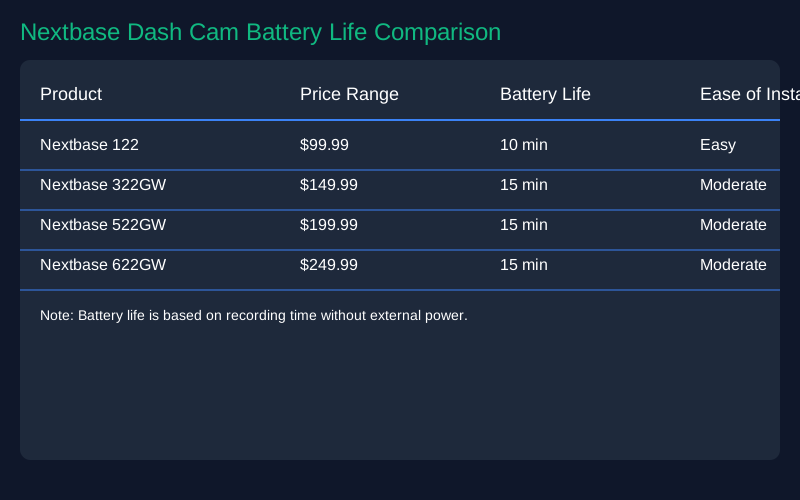
When considering the battery life of a Nextbase dash cam, several key features and specifications should guide your decision. First and foremost, we recommend looking at the expected battery duration that varies across different models. For instance, the latest Series 2 range typically offers around 10 to 15 minutes of recording time on a full charge. While this may seem short, many users find that having the camera plugged into a power source during use can mitigate this limitation.
Another critical aspect to consider is the camera's operational modes. Intelligent Parking Mode is a standout feature that allows the dash cam to conserve battery by utilizing G sensor surveillance, which can last up to 2.5 weeks when the vehicle is parked. This feature is invaluable for users who want to ensure their vehicle is monitored even when they are not present.
In terms of specifications, we recommend prioritizing models that offer a reliable direct power connection, as this allows for uninterrupted recording and longer operational life. For example, the Nextbase 522GW is known for its ability to maintain performance while plugged in, making it ideal for regular use.
Finally, the quality of the battery itself can separate good dash cams from great ones. We have observed that some users report diminished battery performance over time, particularly with models like the 322GW. Therefore, we suggest checking user reviews and warranty options before making a purchase. By focusing on these aspects, you can ensure that your investment in a Nextbase dash cam delivers exceptional performance and reliability.
Top Nextbase Dash Cam Battery Life Recommendations
When it comes to choosing a Nextbase dash cam, understanding the battery life of different models is crucial for ensuring you have a reliable recording solution. Below, we recommend several Nextbase dash cam models based on their battery performance, features, and pricing.
1. Nextbase 622GW - Battery Life: Up to 10-15 minutes on a full charge without direct power. - Specs: 4K recording, Wi-Fi, GPS, and built-in Alexa functionality. - Pricing: Approximately $399.99. - Best For: Users looking for high-quality video and advanced features. The 622GW's short battery life is manageable with a hardwire kit, making it ideal for those who want constant recording while driving.
Pros: Exceptional video quality, built-in emergency response, and a large 3-inch touchscreen for easy navigation.
Cons: High price point and limited battery life when not plugged in.
2. Nextbase 522GW - Battery Life: Similar to the 622GW, lasting about 10-15 minutes on a full charge. - Specs: 1440p recording, Wi-Fi, and Bluetooth connectivity. - Pricing: Around $299.99. - Best For: Those who want a balance between price and high-definition recording. The 522GW is excellent for regular commuters who might not need the full 4K experience.
Pros: Good video quality, smart features like Emergency SOS, and a user-friendly interface.
Cons: Limited battery life, so it is recommended to use with a power supply.
3. Nextbase 322GW - Battery Life: Approximately 10 minutes on a full charge. - Specs: 1080p recording, built-in Wi-Fi, and a 2.5-inch screen. - Pricing: About $199.99. - Best For: Users on a budget who require essential dash cam features without the frills.
Pros: Affordable, decent video quality, and includes intelligent parking mode, which helps conserve battery.
Cons: Battery performance drops over time, and the video quality is not as high as the newer models.
4. Nextbase 402G - Battery Life: 10-15 minutes on a full charge, consistent with other models. - Specs: 1080p recording and a 2.7-inch LCD screen. - Pricing: Approximately $149.99. - Best For: First-time dash cam users who want a straightforward device without advanced features.
Pros: Basic functionality, easy to set up, and reliable for everyday use.
Cons: Lacks advanced features like GPS and Wi-Fi, and battery life is similar to other models.
Overall, we recommend considering your specific needs when choosing a Nextbase dash cam. If you often drive for long periods without the ability to plug in your dash cam, you may want to lean towards models like the 622GW or 522GW and invest in a hardwire installation. However, if you are looking for straightforward functionality at a lower price point, the 322GW or 402G may be the perfect fit.
How to Set Up Your Nextbase Dash Cam Battery Life
To ensure you get the most out of your Nextbase dash cam battery life, we recommend following these practical usage instructions and installation tips. First, when setting up your dash cam, it is essential to connect it to a constant power source using the provided car charger. This will maximize its functionality, as the battery alone will only last about 10 to 15 minutes once fully charged. If you want to use features like Intelligent Parking mode, which conserves battery for G sensor surveillance, it is crucial to keep your dash cam connected to power.
Next, we suggest installing your dash cam in a location that provides a clear view of the road without obstructing your line of sight. Most models, including the Nextbase 622GW, come with a sticky mount that allows for easy attachment to your windshield. Make sure to clean the surface before installation to ensure a secure fit. You can also adjust the angle of the camera to capture the best possible footage.
To get started, we recommend downloading the My Nextbase Connect app, which allows you to control settings directly from your smartphone, view recorded footage, and receive firmware updates. This app can significantly enhance your user experience. Additionally, be sure to check for any firmware updates regularly to keep your dash cam functioning optimally.
Lastly, if you notice that your battery life is significantly shorter than expected, consider replacing it, especially if your dash cam is new and not holding a charge as it should. If you encounter issues, you can find manuals, FAQs, and video tutorials on the Nextbase support website, which provide helpful insights on troubleshooting and optimizing your device's performance. By following these guidelines, you can ensure that your Nextbase dash cam battery life is managed effectively, providing reliable recording for your driving needs.
Care and Maintenance Tips
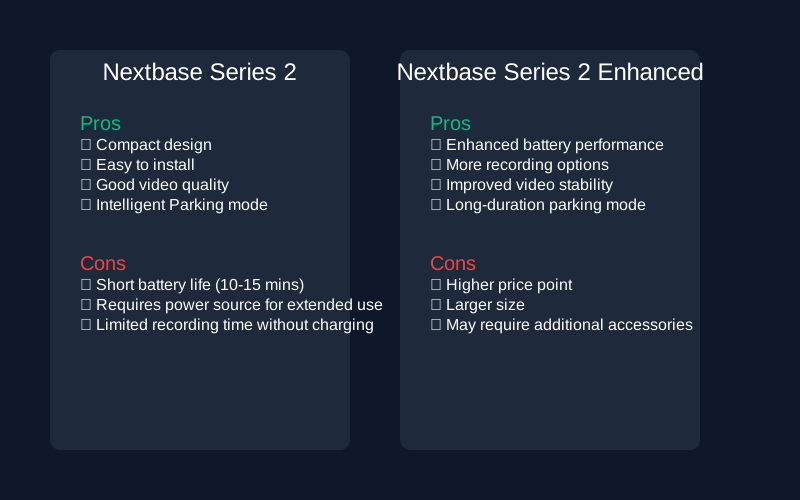
To ensure the longevity of your Nextbase dash cam's battery life, we recommend following several care and maintenance tips. First and foremost, regular usage is crucial. While the battery in models like the 522GW and 622GW typically lasts around 10 to 15 minutes when fully charged, utilizing the dash cam's direct power connection while driving can help maintain battery health. When you park the vehicle, consider activating Intelligent Parking mode, which conserves battery life by allowing G sensor surveillance for up to 2.5 weeks without significant battery drain.
Cleaning is also essential for optimal performance. Use a soft, lint-free cloth to gently wipe the lens and screen of your dash cam. Avoid using any harsh chemicals or abrasive materials as they can scratch the surface and impair video quality.
When it comes to storage, we advise keeping your dash cam in a cool, dry place away from direct sunlight and extreme temperatures, as these conditions can negatively impact battery performance. If you anticipate not using the device for an extended period, it is wise to partially charge the battery and store it separately to prevent it from completely discharging, which can lead to permanent battery damage.
Lastly, be aware of common issues to avoid. If you notice that your dash cam's battery life significantly diminishes after a few months, this may indicate that the battery is failing. In such cases, contacting the retailer for a replacement is advisable. Regularly updating the firmware can also help improve battery efficiency and overall performance, so make sure to check for updates frequently. By following these tips, you can maximize the lifespan and functionality of your Nextbase dash cam.
Final Recommendations
In conclusion, when it comes to choosing the right Nextbase dash cam based on battery life, we recommend several options tailored to different user needs and budgets. For those who prioritize long battery life and advanced features, the Nextbase 622GW is our top pick. It offers excellent video quality and can be paired with a hardwire kit for continuous power, making it ideal for frequent drivers who want to ensure uninterrupted surveillance.
If you're looking for a more budget-friendly option, the Nextbase 322GW is a solid choice, offering good performance at a lower price point, although its battery life may not meet the expectations for long-term use without charging. For occasional users or those who want a straightforward solution, the Nextbase 522GW strikes a balance between performance and affordability, with a battery life that holds up fairly well, especially when utilizing the Intelligent Parking mode feature.
Ultimately, we encourage potential buyers to consider their specific driving habits and how often they will require the dash cam to operate without external power. With prices ranging from around $179.99 for the 322GW to approximately $249.99 for the 622GW, there's a model for every budget. Make sure to assess your individual needs and select the Nextbase dash cam that best fits your lifestyle.