None
Why Your Car Needs a Backup Camera in 2025
Backing up safely shouldn't be guesswork. Backup cameras have evolved from luxury add-ons to essential safety features that every driver should consider. We've tested dozens of models to help you understand what makes a great backup camera and which options suit different vehicles and budgets. According to the NHTSA, reversing accidents account for thousands of injuries every year. A quality backup camera eliminates blind spots, shows real-time video feeds, and gives you complete confidence when parking or backing into tight spaces. Whether you drive a compact sedan or a large truck, there's a solution for your needs. Why we care about backup cameras:Types of Backup Cameras: Which One Is Right for You?
Backup cameras aren't one-size-fits-all. Understanding the different types helps you make an informed choice based on your vehicle's electrical system, budget, and installation preferences.
Wired Backup Cameras
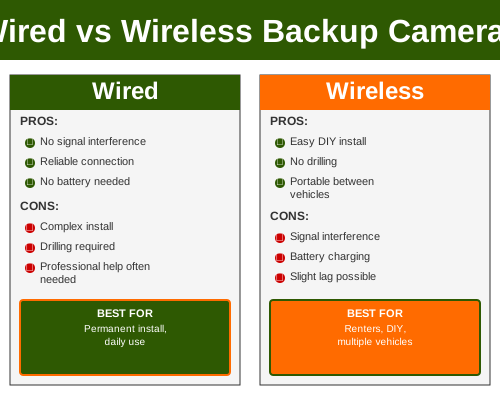
Wired systems connect directly to your vehicle's power supply and display output. They're reliable, don't require batteries, and provide consistent video quality. The trade-off is installation complexity—running cables through your vehicle can be time-consuming but results in a permanent, stable solution.
Wireless Backup Cameras
Wireless cameras transmit video via 2.4GHz or 5GHz signals to a receiver connected to your infotainment system or phone. Installation is simpler since you avoid extensive wiring. However, wireless signals can be affected by interference, and you'll need to manage battery life on cordless models.
Mirror-Mount Backup Cameras
These systems replace your existing rearview mirror or mount alongside it, displaying the camera feed on a built-in screen. They're ideal for vehicles where headrest or dashboard mounting isn't practical. Modern mirror-mount options include touch controls and wide-angle viewing.
License Plate-Mounted Cameras
The most popular style, these cameras integrate with or mount behind your license plate. They're discreet, experience minimal wind buffeting, and align naturally with a driver's eye line when reversing. Most modern backup cameras fall into this category.
Dashboard-to-Rear Systems
These feature a small front-dashboard camera that also captures rear video, offering dual-viewing capability. They're excellent for monitoring both sides of your vehicle and can record continuously when parked.
Key differences at a glance:
Installation time: Wireless (1-2 hours) vs. Wired (2-4 hours) vs. Mirror-mount (30 minutes)
Video quality: Wired systems typically offer superior resolution
Battery dependency: Wireless models may require monthly charging
Cost: Wireless and mirror-mount typically cost less than hardwired systems
Permanence: Wired systems are most difficult to remove; wireless can be relocated
Compatibility: Check your vehicle's existing infotainment system before purchasing
Weather resistance: License plate-mounted cameras handle rain better than elevated mirrors
Image lag: Wireless can introduce 100-500ms delay; wired is instantaneous
Customization: Mirror-mount offers the most aesthetic options
Lifespan: Hardwired systems last longest; wireless batteries degrade over time
Key Features That Matter: What to Look For
Not all backup cameras are created equal. These features separate excellent cameras from mediocre ones and should guide your purchasing decision.
Video Resolution and Clarity
Look for 720p as the minimum, though 1080p is increasingly standard. 4K options exist but require compatible displays and higher bandwidth for wireless transmission. Higher resolution helps you spot obstacles and judge distances more accurately.
Night Vision Capability
Infrared or thermal night vision isn't just for fancy vehicles anymore. We recommend cameras with at least 6 infrared LEDs for reliable visibility in low light. You'll appreciate this feature during evening errands or nighttime parking.
Viewing Angle
Wide-angle lenses (170-190 degrees) capture more of your surroundings than standard angles. However, wider angles can introduce barrel distortion. Look for models that balance breadth with accuracy.
Image Delay (Latency)
Wired systems have virtually zero delay. Wireless cameras should have under 300ms latency to feel natural. Anything above 500ms creates that "delayed" feeling when maneuvering.
Weather and Dust Resistance
Your backup camera faces road spray, mud, and harsh conditions. IP67 or IP68 rating ensures dust and water protection. Cameras with sealed lenses are less prone to condensation fogging.
Display Integration
Consider whether the camera integrates with your existing head unit or requires a separate screen. Factory integration looks cleaner; aftermarket systems offer more flexibility. Some cameras support smartphone apps, adding versatility.
Dynamic Guidelines
Dynamic steering lines that rotate with your wheel are incredibly useful for visualization during tight maneuvers. Some systems offer custom line adjustments to match your specific vehicle's turning radius.
Backup Camera Installation Requirements
Confirm your vehicle has reverse signal detection or you'll need manual activation. This determines whether the camera turns on automatically or requires a button press.
Color Rendering in Daylight
Some cameras have poor white balance in sunlight, washing out details. Test reviews should include daylight footage to verify color accuracy and contrast.
Motion Detection and Recording
Cameras with built-in recording can document parking lot incidents. Look for loop recording that overwrites old footage, conserving storage space on the camera itself.
Best Backup Cameras 2025: Top Picks and Reviews
We've evaluated the leading backup cameras across different price points and types. Here are our top recommendations for 2025.
Premium Choice: Viofo A139
The Viofo A139 combines a front-facing dash camera with professional-grade rear backup capabilities. You get 4K resolution on the front channel and 1080p rear backup, along with exceptional night vision. Installation requires professional wiring, but the dual-camera system justifies the investment for serious documentation needs. The wireless connectivity to your smartphone is seamless.
*Our Take:* This camera targets drivers who want backup safety plus comprehensive vehicle documentation. The price tag is steep, but the build quality and video clarity are outstanding.
Pros:
4K front camera with 1080p rear backup
Excellent night vision with infrared
Two-way WiFi connectivity to phone app
Professional-grade build quality
Large 3-inch touchscreen option
Cons:
Premium pricing ($800-1200)
Installation complexity
Requires significant electrical integration
Larger footprint than basic backup cameras
---
Best Value: 70mai Backup Camera Pro
The 70mai offers wireless convenience without sacrificing core features. You get 1080p backup video with night vision, wireless transmission to your existing infotainment system, and a relatively simple installation process. The battery lasts approximately 2-3 weeks between charges, making it practical for regular use. Dynamic guidelines are included.
*Our Take:* This is our go-to recommendation for budget-conscious drivers who don't want to compromise on essential features. The wireless approach means minimal installation fuss.
Pros:
Wireless transmission to compatible systems
1080p with solid night vision
Easy 1-2 hour installation
Rechargeable battery lasts 2-3 weeks
Dynamic steering guidelines
Cons:
Wireless signal can be affected by interference
Battery management required
May not integrate with older vehicle systems
300ms latency on wireless transmission
---
Best for Trucks: Rear View Safety RVS-770613
Designed specifically for larger vehicles, this hardwired system features a commercial-grade IP67-rated camera optimized for truck applications. The 170-degree wide angle is perfect for monitoring blind spots on trucks and SUVs. Installation connects to reverse signal detection for automatic activation. The 7-inch display is bright and readable in sunlight.
*Our Take:* If you own a truck or large SUV, this camera understands your vehicle's specific challenges. The wide angle and sunlight-readable display are game-changers for commercial or work vehicles.
Pros:
Commercial-grade durability
Wide 170-degree field of view
Hardwired for reliable operation
7-inch sunlight-readable display
Strong IR night vision
Cons:
Hardwired installation required
Higher cost ($600-900)
Bulky display unit
Professional installation recommended
---
Best Budget Option: Garmin BC35
For under $200, the Garmin BC35 delivers solid backup functionality. This wired camera integrates seamlessly with Garmin dashcams and head units. You get 720p resolution, IP69K weatherproofing, and a compact license plate mount. The system requires a compatible Garmin receiver, so confirm your vehicle model before purchasing.
*Our Take:* This camera is perfect for Garmin ecosystem owners and drivers who want straightforward, no-frills backup assistance without breaking the bank.
Pros:
Affordable pricing ($150-200)
Excellent Garmin integration
IP69K weatherproofing
Compact and discreet design
Reliable wired operation
Cons:
Requires compatible Garmin head unit
720p resolution is basic by 2025 standards
Limited to Garmin ecosystem
Professional installation recommended
---
Best for Mirror Mounting: Pyle PLCM7500
If you prefer integrating backup camera functionality into your rearview mirror, the Pyle PLCM7500 is excellent. The mirror itself becomes your display, showing backup camera video automatically when in reverse. The 4.3-inch display is bright, and touch controls are intuitive. Installation involves mirror replacement and power connection.
*Our Take:* Mirror mounting appeals to minimalists who want backup capability without additional dashboard clutter. The Pyle system delivers solid performance in this category.
Pros:
Integrated into rearview mirror
4.3-inch color display
Automatic activation in reverse
Touch controls and menu options
Minimal dashboard impact
Cons:
Requires mirror replacement
Display can be small for some vehicles
Professional installation typical
Mid-range pricing ($400-600)
---
Best Smartphone Integration: Apeman 4K Dash Cam with Backup
This dual-channel system prioritizes smartphone app integration, allowing you to review backup footage wirelessly. 4K front recording with 1080p rear backup creates comprehensive vehicle documentation. The app interface is intuitive, and cloud storage options are available.
*Our Take:* Modern drivers appreciate the convenience of smartphone access. This camera brings backup safety into the connected-vehicle ecosystem.
Pros:
Full smartphone app integration
4K front, 1080p rear recording
Cloud storage option available
Seamless WiFi connectivity
Professional build quality
Cons:
Premium pricing ($700-1000)
Requires smartphone for full functionality
Slightly higher complexity installation
App-dependent for some features
Installation Options: DIY vs. Professional Installation
Backup camera installation ranges from straightforward to complex depending on the system type. Understanding your options helps you choose the right approach for your situation.
DIY Installation Advantages
Installing your own backup camera saves on labor costs (professional installation typically runs $200-500). Many wireless systems are genuinely DIY-friendly—you can mount the camera, pair it wirelessly, and be done in 2-3 hours. This approach works well if you're mechanically inclined and your vehicle has a modern infotainment system.
DIY Installation Challenges
Hardwired systems require running power cables through your vehicle's interior, which is more complex. You need to identify the reverse signal wire, splice connections carefully, and navigate through door jambs and trunk panels. One mistake can disable your reverse lights or create a fire hazard. Many experienced DIYers recommend professional installation for wired systems.
Professional Installation Benefits
Authorized installers understand your specific vehicle's electrical system. They know where reverse signal wires are located, have proper splicing equipment, and can warranty their work. Professional installation typically adds $300-500 to your total cost but provides peace of mind and long-term reliability.
Choosing Between DIY and Professional
Go DIY if:
You're installing a wireless or mirror-mount camera
Your vehicle has a standard aftermarket head unit
You're comfortable with basic automotive electrical work
The installation doesn't require factory integration
The camera manual explicitly supports self-installation
Choose Professional if:
The system requires hardwired power integration
Your vehicle has factory infotainment requiring proper interfacing
You need reverse signal wire integration
The installation involves removing panels or steering columns
The camera manufacturer recommends professional installation
You want a warranty on installation quality
Common Installation Issues and Solutions
No power to camera: Check your reverse signal wire detection; you may need a relay module
Delayed video feed: Ensure wireless receiver is properly positioned; reduce sources of 2.4GHz interference
Blurry image: Clean the lens carefully; check for lens condensation inside the waterproof seal
Steering lines don't align: Most systems allow calibration; check your system's menu for steering angle adjustment
No video but camera powers on: Confirm proper video signal routing and receiver placement
Interference and dropouts: Move the wireless receiver away from other WiFi devices and metal structures
Professional Installation Services
Best Buy, local audio shops, and dealerships offer backup camera installation. Prices vary by complexity, but expect $300-500 for professional labor. Some shops bundle camera purchase with installation discounts.
Tools You'll Need for DIY Installation
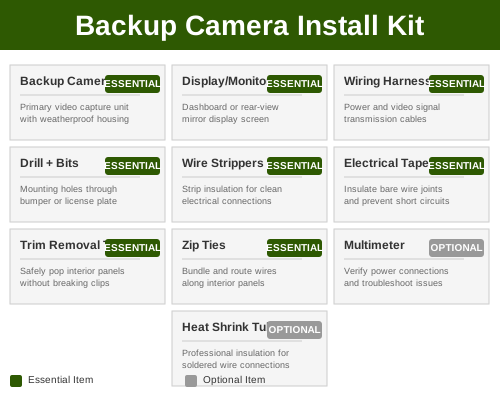
Minimal tools are required for most installations. You'll need a soldering iron (or crimp connectors), wire stripper, panel removal tools, and a multimeter for testing connections. Wireless systems can be installed with just a screwdriver and power drill.
Safety Considerations
Always disconnect your vehicle's battery before working with electrical systems. If you're uncomfortable splicing wires, don't hesitate to get professional help. Factory integration errors can disable critical vehicle systems.
Timeline for Installation
Wireless systems: 1-2 hours DIY
Mirror-mount systems: 30-45 minutes DIY
Hardwired systems: 3-6 hours professional
Factory integration: 4-8 hours professional
Testing After Installation
Once installed, test the camera thoroughly. Put the vehicle in reverse and confirm clear video feed. Check night vision by testing in a dark environment. Verify steering lines match your vehicle's turning radius. Test in various weather conditions before considering the installation complete.
Frequently Asked Questions About Backup Cameras
Q: Do I really need a backup camera if my car already has sensors?
A: Cameras and sensors serve different purposes. Sensors detect obstacles but don't show you what's behind your vehicle. Cameras provide visual confirmation of what's actually there—including small obstacles, curbs, and children that sensors might miss. We recommend using both together for maximum safety.
Q: Can I install a wireless backup camera myself?
A: Yes, most wireless backup cameras are DIY-friendly. Mount the camera, connect the power, pair it with your receiver, and you're done. Installation typically takes 1-2 hours. Just ensure your vehicle's infotainment system supports the wireless standard (usually 2.4GHz WiFi or proprietary frequency) before purchasing.
Q: What's the difference between infrared and thermal night vision?
A: Infrared uses LED lights to illuminate the scene at night, similar to how night-vision goggles work. Thermal imaging detects heat differences, working in complete darkness but typically with lower resolution. For backup cameras, infrared is more common and sufficient for reversing safely at night.
Q: Will a wireless backup camera work if I have an older car?
A: Wireless cameras typically require a compatible receiver that connects to your infotainment system. If your car has a basic factory radio with no auxiliary input, you'll either need to upgrade your head unit or consider a wired system with a separate display screen. Check your vehicle's specifications before purchasing.
Q: How often do I need to charge a wireless backup camera battery?
A: This depends on the camera model and usage. Most wireless cameras with rechargeable batteries need charging every 2-4 weeks with regular backing up. Some modern models advertise longer intervals. Always check the manufacturer's specifications, as battery life varies significantly between brands.
Q: Is 720p resolution good enough for a backup camera?
A: 720p is adequate for basic backup assistance and obstacle detection. However, 1080p is now the industry standard and provides noticeably better clarity for identifying small obstacles and judging distances. If you're purchasing a new camera in 2025, we recommend 1080p as the minimum.
Q: What does IP67 or IP69K weatherproofing mean?
A: These are ingress protection ratings. IP67 means the camera can handle water spray and temporary immersion. IP69K is higher, indicating resistance to high-pressure water jets. For backup cameras exposed to weather, IP67 minimum is recommended. Most modern cameras meet or exceed this standard.
Q: Can I use my backup camera while driving forward?
A: Not on most standard backup cameras—they're designed to activate only in reverse for safety and legal reasons. Some dual-camera systems let you view both front and rear feeds, but true simultaneous forward and backward viewing is rare and typically reserved for high-end commercial vehicles.
Q: How do dynamic steering lines work?
A: Dynamic lines rotate in real-time based on your steering wheel input. They show your vehicle's predicted path at your current steering angle, helping you visualize exactly where your rear bumper will go. This is invaluable for tight parking situations and backing into trailers.
Q: Will my backup camera void my vehicle's warranty?
A: Aftermarket cameras generally don't affect your factory warranty, but professional installation that touches factory electrical systems could create issues. Document your installation and keep receipts. If problems arise, discuss the installation with your dealership to clarify coverage.
Q: What's the typical lifespan of a backup camera?
A: Hardwired cameras typically last 7-10 years or longer. Wireless cameras with rechargeable batteries degrade earlier—expect 5-7 years before battery performance significantly declines. Most cameras fail due to environmental exposure (water damage, extreme heat) rather than electronic failure.